The post 3 Tips for SEO Keyword Research appeared first on Toronto SEO Expert.
]]>- Look at the SERP (Search Engine Results Page): One of the best ways to get an idea of how likely your website is to rank for specific terms on Google is by assessing the websites that Google is currently ranking for those terms. If Google is ranking websites that are similar to yours in terms of context and metrics than you have a good chance of ranking. Although if Google is ranking websites that are not very similar to yours than it’s a sign that it will be difficult for you to rank. For example if you are a painting contractor and you are trying to target a keyword that has a bunch of other contractors ranking for it that’s a good sign, but if the keyword your targeting has a bunch of paint manufactures rankings for it, than you should probably rethink it. Personally the tool that I use and recommend for keyword research is KWFinder by Mangools. Using this tool you can easily assess the websites ranking on the first page for a given search term and see all their metrics in one easy spot as well as find other similar terms.
- Don’t be afraid to niche down: When conducting keyword research it can be frustrating trying to find a term that you can easily compete in, especially if your site is new. Usually general terms will be more competitive and as you niche down the competition will decrease. If you provide multiple services instead of trying to target a keyword that broadly covers all your services you might want to target each service specifically and build out separate pages for all the services. Even if the search volume for each service individually is lower combining all of them can often add up to even more search volume while also dealing with less competition. If you are a local business try to target keywords that include your town’s name, if you live in a big city try targeting keywords that include major intersections in your area.
- Look for user intent: It can be easy to get caught up in targeting keywords with the highest search volume but in many cases the highest search volume keyword is not the one that is most likely to convert. For example if you are a painter in Toronto you might be tempted to target a keyword such as “home painting” (90 searches) but this keyword is very general. The people searching for it might be looking for home painting ideas or home painting supplies, it might make more sense for you to target a keyword that shows better search intent such as “professional painters Toronto” (50 search) even though the search volume is lower it is clear that the people searching for it are looking for exactly your services. Usually you can get an idea of how valuable a keyword is by looking at the estimated CPC for that keyword in a Google Ads campaign.
The best way to improve your keyword research is through practice, the more websites you rank on Google the better understanding you will have of how the algorithm works. If you’re looking for a digital marketing agency feel free to reach out to me for help.
The post 3 Tips for SEO Keyword Research appeared first on Toronto SEO Expert.
]]>The post Google Search to Feature Favicons on Mobile appeared first on Toronto SEO Expert.
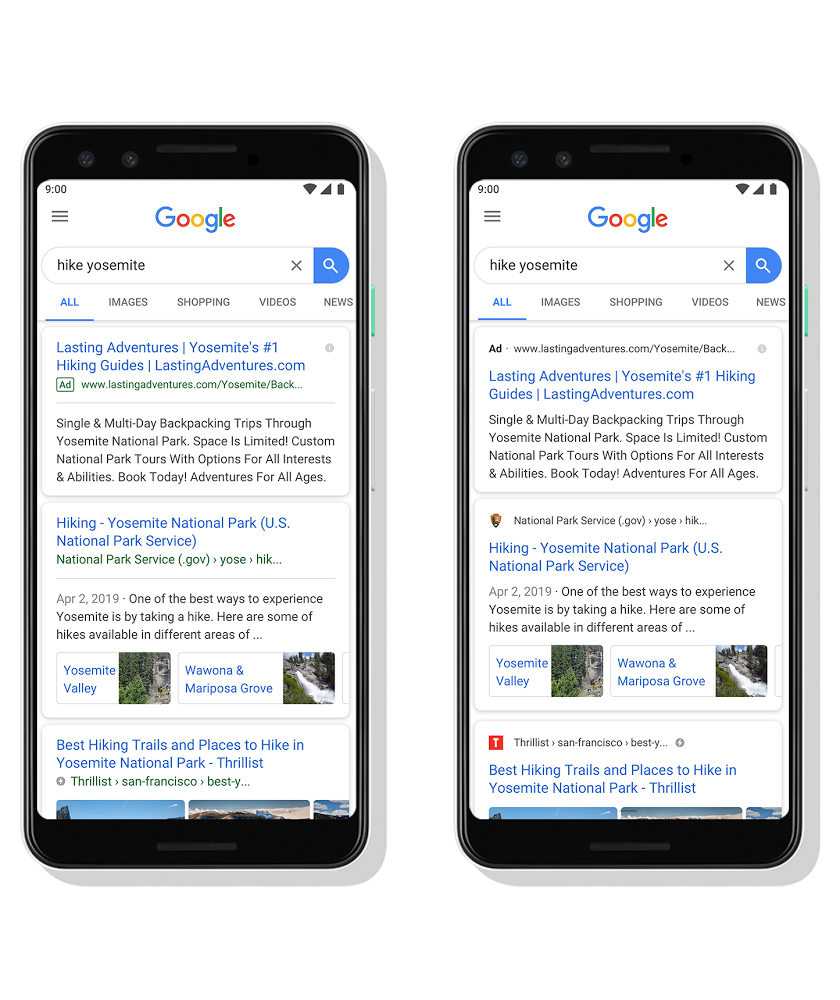
]]>You can see an image Google shared demonstrating the difference below:
What does this mean for SEO?
In my opinion the new design makes it easier for Google to blend ads in with Organic results. I think that the distinction of an ad from an organic result has becoming increasingly difficult for the user to be able to tell.
This is not good for SEO as many users will click an ad when they believe they are clicking the organic result. This also makes it even more important than ever before for your site to have a favicon.
I do think highlighting the favicon is a great idea because it makes it easier to tell if you are visiting the right site (when re-visiting a site you have been on before). Although I wish Google had done it while keeping the green ad icon users are used to instead of switching to a dark generic “ad” text.
How do I check if my site already has a favicon?
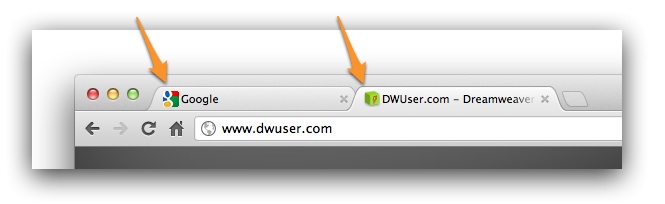
You should be able to see a little icon next to your site’s title inside your browsers tab. If you do not see it than your site probably doesn’t have a favicon, you can use this tool to double check: https://realfavicongenerator.net/favicon_checker
How do I create a favicon?
Creating a favicon is as simple as resizing an image and putting it into the right format. Choosing your image is the hardest part, generally I recommend using a part of your logo. Since the favicon is shown at really small sizes your picture should have as little detail as possible and be easy to identify at small sizes.
You can use this tool to automatically resize it and put it in the right format for you.
How do I add a favicon to my site?
If you don’t have a favicon on your site you will probably want to add one.
If your using a WordPress website usually your theme will have an option to add a favicon to it. Check your theme’s documentation to find it if you are unsure where it is.
If you are using a website builder such as Squarespace or Weebly you should be able to find a spot to change the icon in the website settings.
If your website is custom built or your website builder does not have the option to add a favicon most modern browsers will use a favicon.ico file placed in the root directory of your site. In order to ensure your favicon gets picked up with all browsers add the following code between the <head> </head> tags on your website:
<link rel='icon' type='image/x-icon' href='/favicon.ico' />Or if you icon is a png use this code:
<link rel='icon' type='image/png' href='/favicon.png' />If you use the tool that I linked above than it will automatically provide you with the code required to add to your website.
The post Google Search to Feature Favicons on Mobile appeared first on Toronto SEO Expert.
]]>The post Best On-Page SEO Techniques for #1 Ranking on Google appeared first on Toronto SEO Expert.
]]> Better presence and ranking on search engines is the result of a perfect combination of On-page and Off-page SEO (Search engine Optimization). On-page SEO is the method to optimize individual web pages to rank better and earn more traffic via search engines. During the on-page SEO, HTML source code and content can be optimized, while in Off-page SEO refers to your website’s overall image on the web determined by what other websites say about your business website or how many backlinks you have from Quality websites. As concerned to the on-page SEO, it is a long-term process that takes the time to improve while creating backlinks is the most common formula for a successful off-page SEO and getting them from some popular websites will show some fast results in term on Seo rankings.
The Importance of On-Page SEO
The online promotional industry is growing at a faster pace than ever, yet the on-page SEO remains at the top of the list when it comes to generating more revenue with better ranking and traffic. Following the right on-page SEO techniques ensures that your content and code follow Google’s best practices that further results in your online image. In other words, on-page SEO can make or break your ranking. Perfect Seo can take you top of Google while excessive and wrong on page Seo may push you down in rankings To achieve a maximum outcome of your search engine marketing campaign and keep your users attracted towards your business you need a perfect combination of both the off-page SEO and on-page SEO. Aiming to spread the knowledge about best SEO techniques, we put our best people on the job, and we’d like to share the list we have got:
Page Titles
Whenever talking about the best SEO techniques, page titles are the most important ones. A website has multiple pages, each of them having its title. Using most appropriate targeted keywords in the page titles should be the prime priority for better ranking. Page titles are referred to as H1 tags, and you should never use more than one H1 tag on any of your web pages. For example, if you are creating a page for women footwear collection, you can use the best suitable keywords like “designer women footwear” or “cheap designer footwear” etc. This way, at whatever point someone searches for best designer women footwear in search engine, your website page has a better chance of showing up because you have included those keywords already.
Meta Tags
Just like using page titles is crucial for better ranking, try using the set of best available keywords in the form of Meta tags. Try using them with the most relevant content. Using keywords in Meta tags is important as description Meta tags send Google relevancy signal. While the signals are not as strong as the title tags, (page titles), but descriptions still carry some importance as a ranking factor. This is a simple process where the website admin can easily insert all the information into the page HTML format, making life easier for you.
Meta Descriptions
It’s a common phenomenon; many people forget to include Meta descriptions for their pages. And the reason here is not that they don’t want to add, but they don’t understand the importance of these descriptions. They are the most important part of the better ranking. They may no longer be a Seo practice now, but still, the keywords used in descriptions will show up under your page title in search results making the visitor aware of the content your page carries and hence increasing the Overall CTR rate. For example, if we search for ‘cheap women footwear online,’ then a good Meta tag description for that page would include those keywords and related ones. So, “Stunning yet cheap women footwear online now available with delivery across the globe in your budget,” would be a great Meta description to use, as this includes specific keywords and it clearly explains to the user what is your page all about. 
URL Structure
Many organizations adopt the use of domain name with their company’s name. However, including a search engine, friendly URLs for each of your pages is highly recommended by the experts. These types of URLs help in better crawling rate which means your website pages and content will have more chances to rank on search engines. Shorter URLs seem to perform better; however, that is not the only factor. You can simply edit the permalink of your blog post and add your targeted keywords there, you might be ignoring this practice till now might not have been familiar with it, but this technique is one of the important parts of optimizing on page Seo 
Body Tags
Every website has a blog page, so when writing articles for the blog pages make sure that you break up your content into smaller sections to make it engaging and easier for the people to read. Use body tags on these sections like H2, H3, H4, etc. If you’re new to the tags, it’s good to know the simple tips about using them. Generally, H1 tag is used for main page title while H2 and H3 being used with subsequent headings. When crawling a headline is the first thing that Google will have a look at. So, using keyword-rich headlines is more useful than generic ones. Unlike H1 tag there is no limit to use just single subheading tags in your content, try to wrap up all of our subheadings in body tags.
Keyword Density
Using too much of keywords throughout your content can seem lucrative, but too much of it can turn the results into negative. Hence it’s important not to repeat and overuse keywords just for search engine robots excessively. Using 1-3% of keywords in your content is the right strategy as using more of the said percentage can lead to troubles. Also for better results, you should sprinkle some LSI keywords throughout your content so that your page show up for other similar queries as well
Image Tags or ALT Tags
Image tags or alt tags is the most under looked technique. Alt tags are the tags which show up on the web page when there is a slow connection, and the images on your web page are not loaded so that users can know exactly what images were there which have not been loaded. You can simply add an alt tag in WordPress which uploading an image from the right side of the screen. 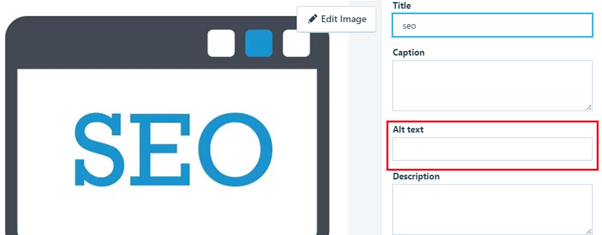
Content Length
Do you know that web pages with long content rank well as compared to web pages with short content? That doesn’t mean adding any irrelevant content to increase the word count but if there is something which is left out then make sure you add it before hitting the publish button. It is advised to add a minimum of 300 words in a post, but if you are targeting some high competition keywords, you have to scale up the words count.
Final Words:
The above-mentioned on-page SEO techniques, if put together, can significantly improve the ranking on search engines while ensuring increased traffic and revenue. Remember that any one of them will not make a positive impact as they need to be used all together for better results. They help your website crawl faster and more often that will help to get your entire site ranking. Google and other search engines will value the internal pages as they will help build the relevancy of internal pages to specific keyword phrases. If, ever, you face trouble in ranking your website on the leading search engines, make sure to have a look at the above-mentioned points as you’re sure to have missed any one of them that would lead to lesser traffic. Take some time and implement them to enjoy a better web presence and sell more immediately online.
The post Best On-Page SEO Techniques for #1 Ranking on Google appeared first on Toronto SEO Expert.
]]>