The post 10 Simple Digital Marketing Ideas For Dentists appeared first on Toronto SEO Expert.
]]>By the end of this post you’ll discover 10 online dental marketing ideas you can immediately apply to attract new patients to your dental practice.
And the best part:
All the ideas are super-easy to implement by anyone in your team.
Sounds interesting? Let’s dive right in.
Reconnect with patients who have already showed interest in your business
In the early days of the Internet:
● there were not that many competitors.
● we weren’t bombarded with a gazillion ads either.
● people informed themselves less
Now the decision journey is much longer (especially for more expensive services/products).
For instance, now we might look into the mirror and notice our teeth got yellow.
We want to find out why. We ask Google why do we have yellow teeth.
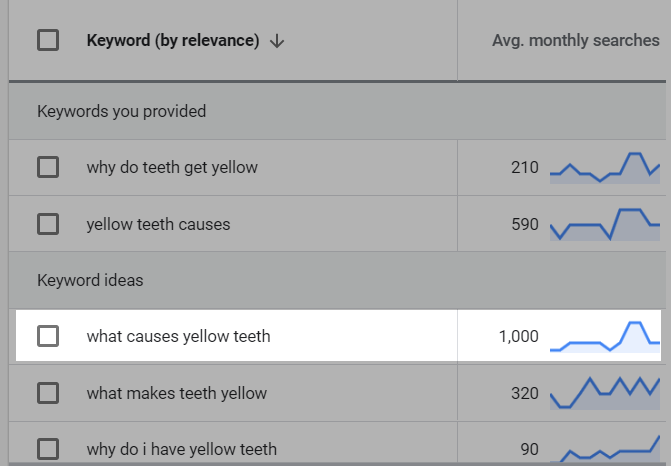
The screenshot above is taken from Google Keyword Planner, a tool that shows you how many times per month (on average) a certain keyword/phrase is searched on Google, in a certain location.
Next, we want to find out what we can do about it.
We might look for different solutions.
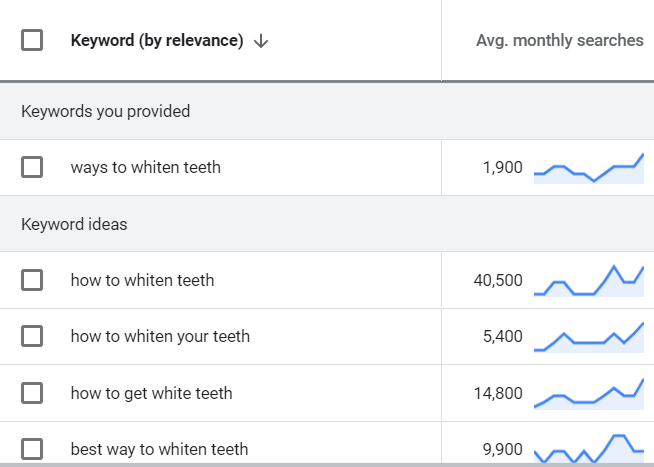
Once we have different options, we might want to find out which one is the best or the safest.
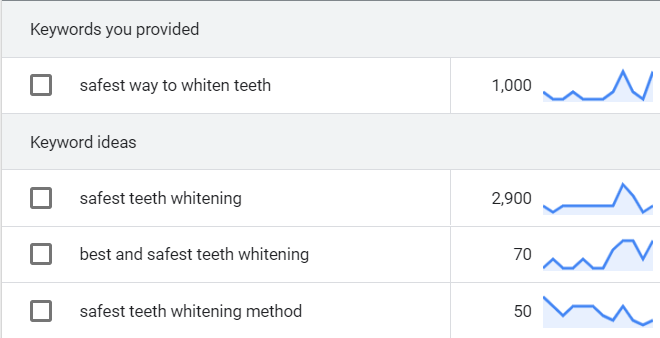
Next, we look for a dental clinic near us.
But maybe we aren’t convinced yet (or we aren’t ready).
We then read some reviews to make sure we’re making the right decision.
Then we might want to see some case studies too.
Or we compare different clinics.
And only then we schedule an appointment.
Now, some people might make the decision faster.
But studies show that only 2% of website visitors convert during their first visit.
And we need between 6-9 interactions with someone until they reach a decision.
That’s why a single ad, is not enough anymore.
And this is where Retargeting comes into play.
Facebook has a feature called Retargeting which allows you to show a piece of content only to people who have previously interacted:
- With your website
- Or with your Facebook page
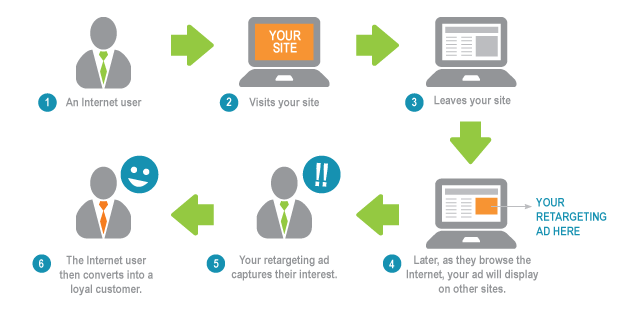
For instance, you can retarget people who have visited one of the pages where you present a certain treatment:
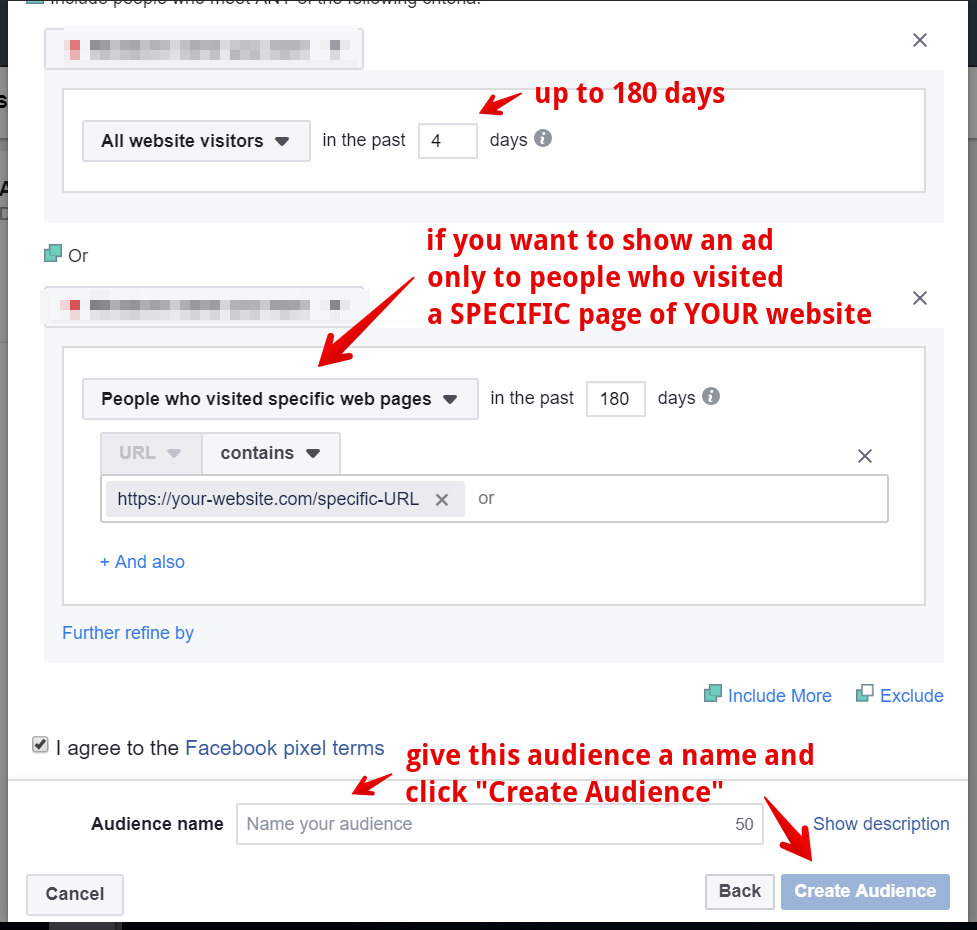
Or you can show another piece of content to people who have liked your Facebook page.
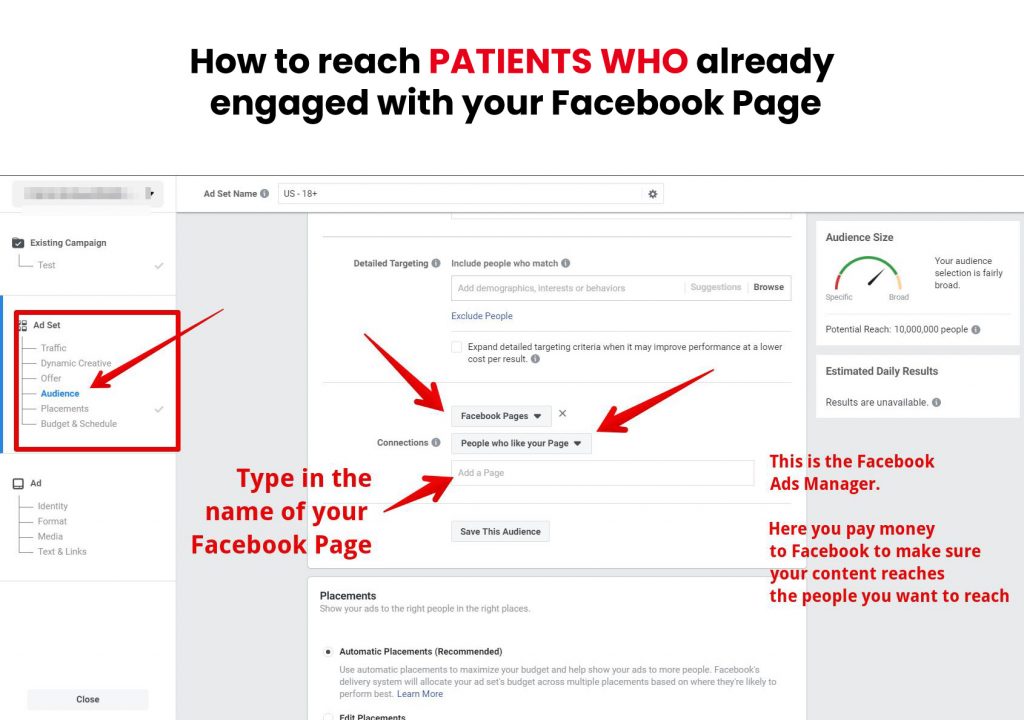
Or to people who have watched one of your Facebook videos:
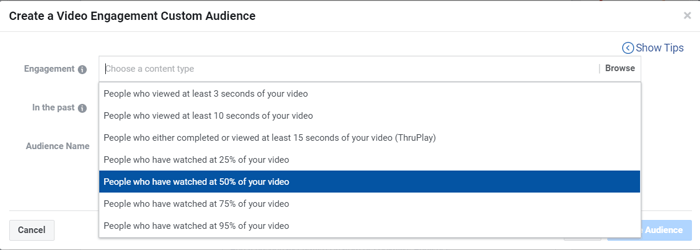
Or to people who have interacted with your Facebook page in any way (liked, commented, shared or clicked one of your ads etc.)
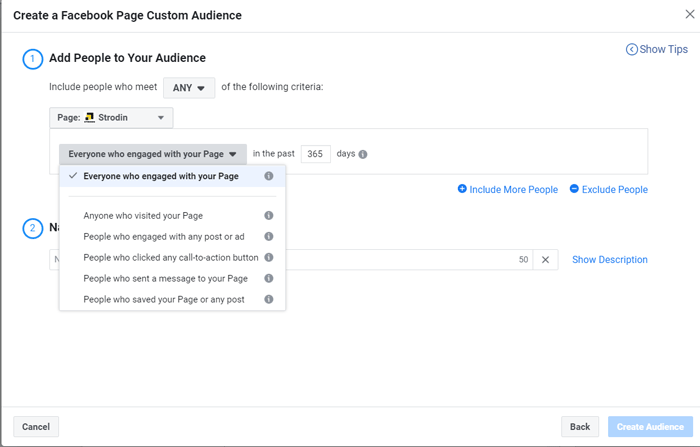
How you can use this?
Well, for instance, if someone visited your dental braces page and hasn’t scheduled an appointment you can then show this person an ad that might answer to some of his or her objections related to this service.
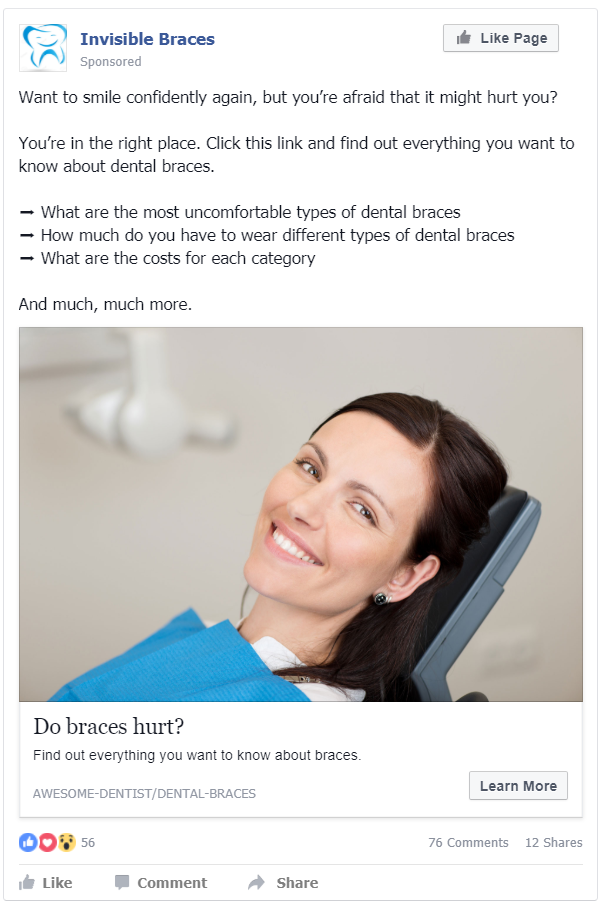
Or you can present them an offer.
The possibilities are unlimited.
Create a (lead generation) funnel for each service
We’ve seen earlier that having a single touch point with your potential patient is not enough.
Because only 2% of the visitors convert the first time (and that’s a good number!)
If you don’t have a funnel, you lose the other 98% of the potential patients.
What is a funnel?
In simple terms, it’s system through with you:
- Attract
- And convert
complete strangers into someone who showed interest in one of your dental treatments.
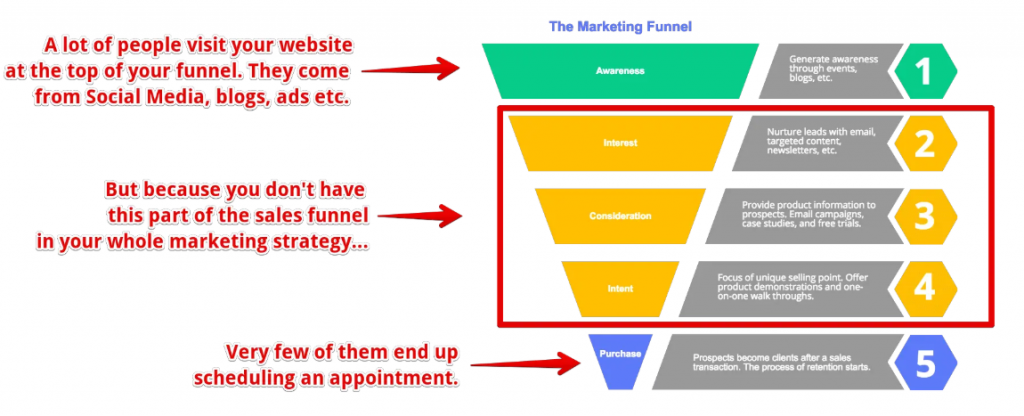
Once the person shows interest in one of your dental treatments (a.k.a becomes a lead), you nurture this lead until he or she becomes a patient.
Simply put, you “guide” the person through every step of their decision process.
One way you can do this is through retargeting.
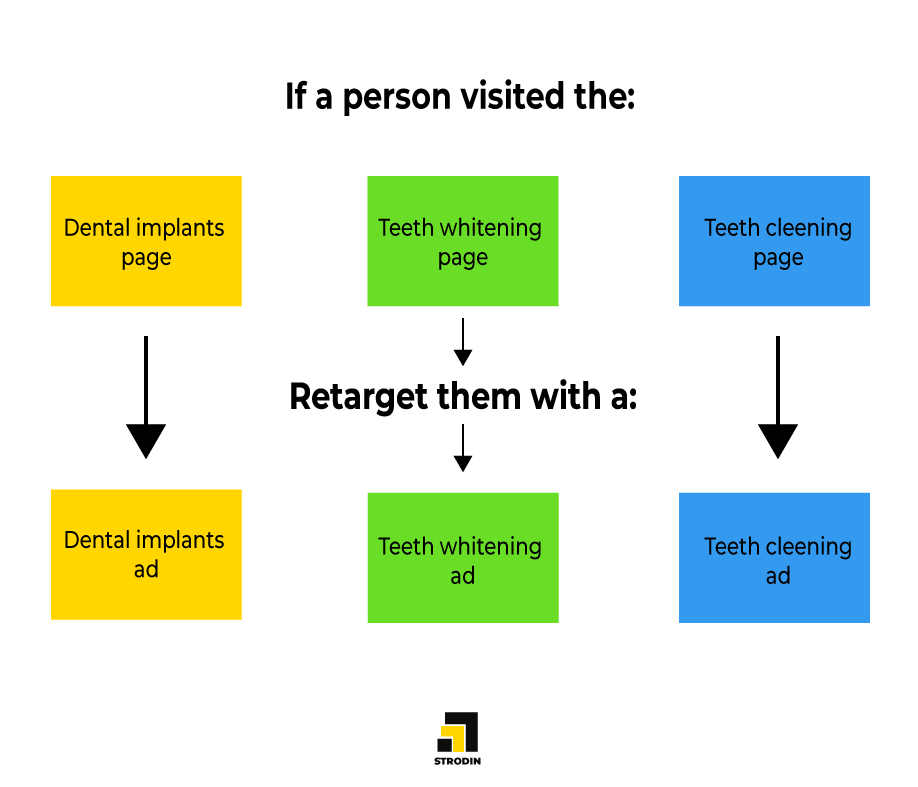
But the downside of retargeting is that you pay money to Facebook every time you want to communicate something to your potential patients.
This is why email marketing and Facebook Messenger is much more effective.
You communicate with your potential patients without any limitation and without paying anything.
Here’s a few tips to successfully convert strangers into leads and then into patients through an email marketing automated system:
- Create a relevant hook to build your list (e.g. don’t give away an iPhone to get email subscribers)
- Segment your list based on what people are interested in
- Send useful content = answer people’s questions/objections
- Send offers based on the segments/lists you’ve created
Use Facebook’s Lookalike feature to reach people similar to your existing patients
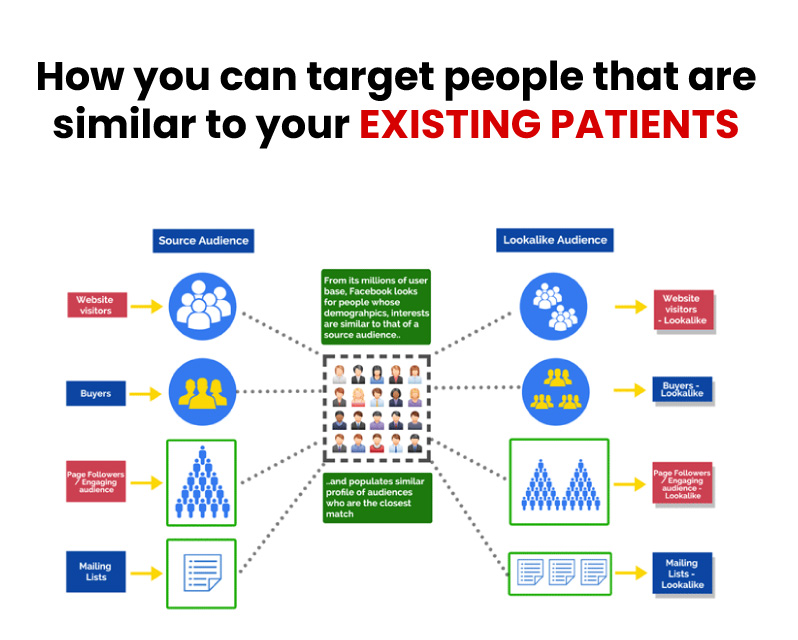
What if you could “hire” Facebook to do all the heavy-lifting for you and find people who are similar to your existing patients?
It’s possible and it is so easy to do it.
Facebook has a cool feature called Lookalike Audience. This feature allows you to basically instruct Facebook:
“Hey Facebook, in the last 6 months a bunch of people scheduled an appointment on my website.
Please show my ad to people that look SIMILAR to these patients”.
And now Facebook will show your content (or ad) only to those people with SIMILAR interests, behaviors, demographics, etc. with the people who scheduled an appointment on your website.
Simply put, you can reach your IDEAL PATIENT without much effort.
But how can Facebook find more people similar to the people who visited your website?
Well, because Facebook knows a lot of stuff about us:
- what websites we visit
- what videos we watch
- what are our interests
- our marital status
- places we visit
- what interest we have
- even the time we spend looking at certain photos
- and other a few hundred thousand data points.
And all these signals will be used when we (as a business) are trying to target customers.
This feature is one of the most powerful targeting features you can use and it’s not complicated to set up.
Track your results
There are so many dental marketing ideas you can try to attract new patients.
But without properly tracking what works and what doesn’t it’s like painting in the dark.
Here are a couple of things you should measure and track:
Conversion rate: how many people visit your website (or click your ads) versus how many actually schedule an appointment by completing a form?
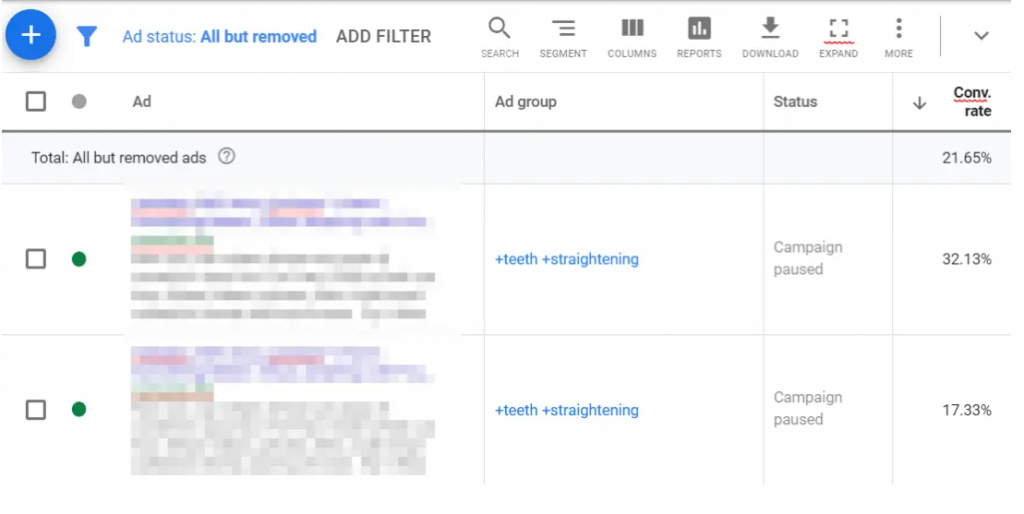
Conversion rate/channel: which marketing channel brings you the most patients?
Time on site: how much time do visitors spend on your website before leaving?
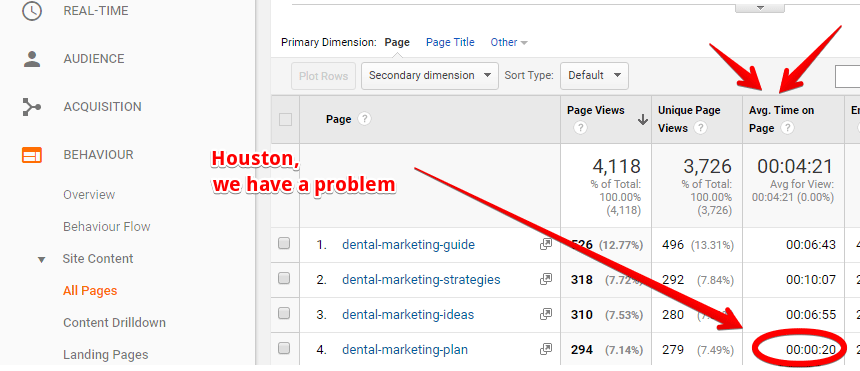
New visitors vs. returning visitors: do people return on your website/blog?
Form abandonment: how many people started completing your contact form vs. how many abandoned it
Email:
- open rate: how many people receive your email vs. how many open it
- clickthrough rate: how many people open your email vs. how many click it
- unsubscribe rate: how many people don’t want to receive your emails anymore
Cost per lead: how much does it cost to get a single lead?
Cost per “sale”: how much does it cost to attract a new patient?
Referral rate: out of your total number of patients, how many of them were referred by your existing patients?
Implement a referral system
Your best patients are probably already referring friends, family, and business associates to you from time to time.
And if you carefully analyze your dental practice, chances are these people are probably very similar to your best patients — similar interests, similar desires, similar buying habits.
The problem is that most dental practices I’ve seen, they settle for the small
amount of business these passive referrals bring in – without ever actively asking referrals from their existing patients.
But think about the amount of new patients you currently get through passive referrals. Now
imagine five or ten or 20 times that amount.
This is what happens when you implement an ‘active” referral system. A simply active referral program can immediately bring in new patients.
One of the simplest active referral programs could be an incentive:
For instance, you might offer a $25 discount on an initial exam for new
patients referred by an existing patient.
Why? Because your existing patients are more likely to approach people if they can offer them some sort of “inside deal” only available through their referral.
You can can also give them a special gift card and tell them something along the lines:
“You know, we do no advertising. It’s mostly through word of mouth that we get real nice patients like you. if you have a relative, friend or co-worker that you’d like to refer to this office, it would be real nice.”
Optimize your dental practice for local search
The most effective dental marketing ideas to get new patients fast is to show up in the exact moment someone is actually looking for a dentist.
Therefore, optimizing your online presence so that your practice shows up when someone performs a local search such as “dentist in location” should be among your top priorities when it comes to marketing your practice online.
There are 2 ways you can do this:
The fastest one is to set up and optimize a Google My Business listing.
Google My Business is a section of Google’s search results that shows the local business related to your query.
So when someone Googles “dentist in [location]”, your dental practice can show up:
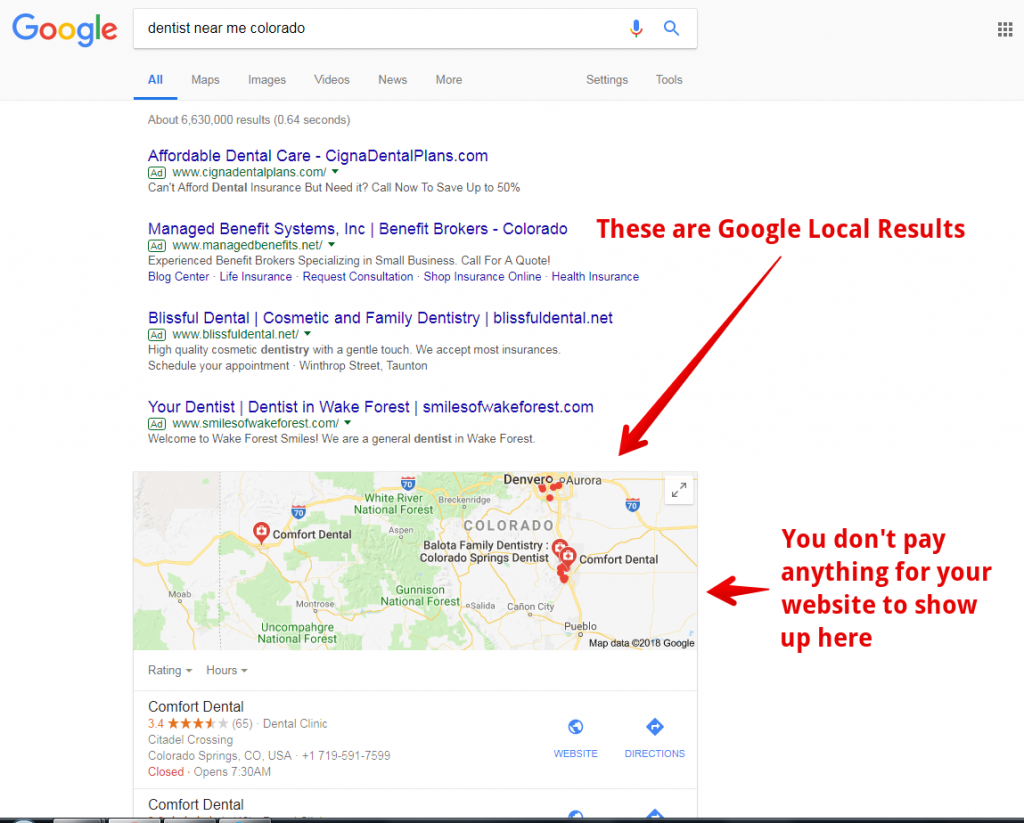
But in order for your dental practice to show up there you have to:
- Create a Google My Business page (it’s free and simple to use)
- Verify that you are the owner of the business (step by step tutorial here)
- Make sure you provide every little detail about your business
- Get (a lot) of reviews
Here’s a complete tutorial that shows you step by step how to do all these.
You should also make sure your dental website shows up among the top positions when someone searches for “dentist in [location]”.
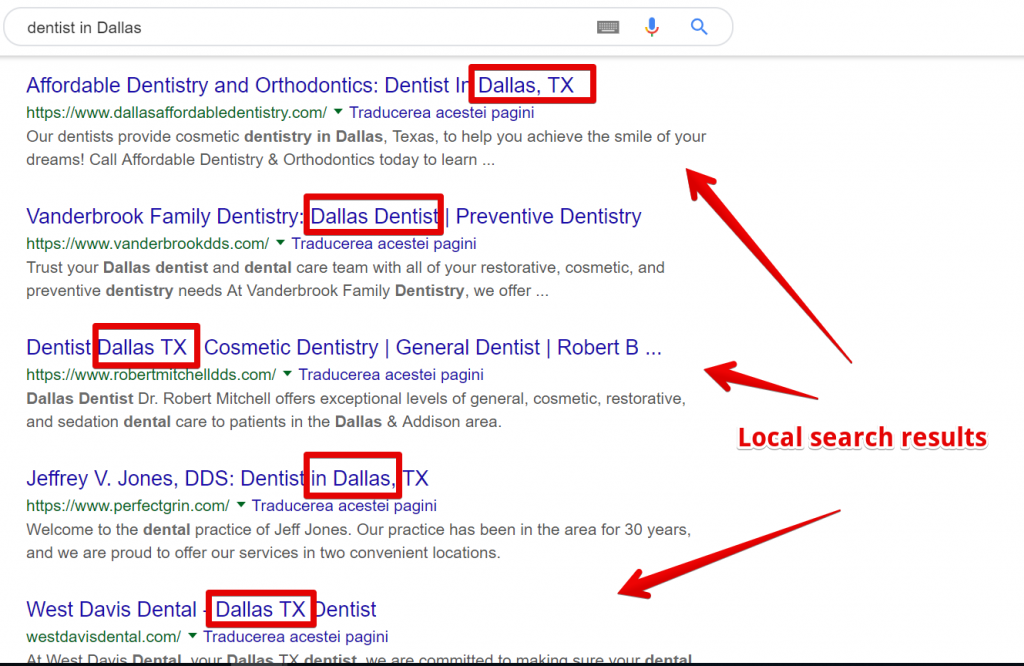
This involves a process called local SEO (Search Engine Optimization).
Simply put, you have to perform little “tweaks” to your website in order for Google to:
- recognize that your website is a local dental practice in X location
- recognize your website is better (and more relevant) than other dental practices.
Some of those “tweaks” are:
Choosing the proper keyword and including it in the title tag of your website.
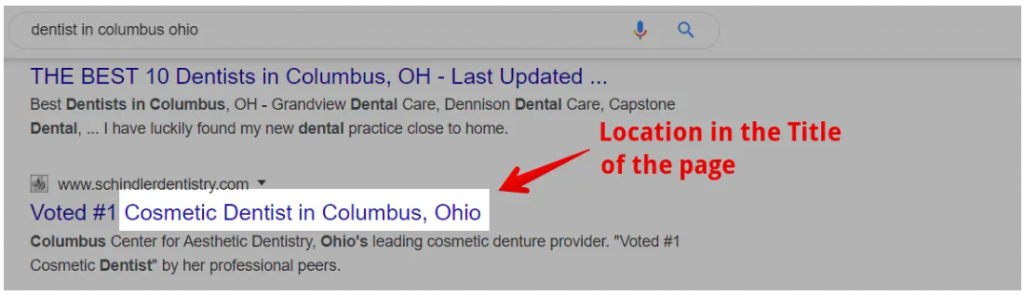
and in your content.
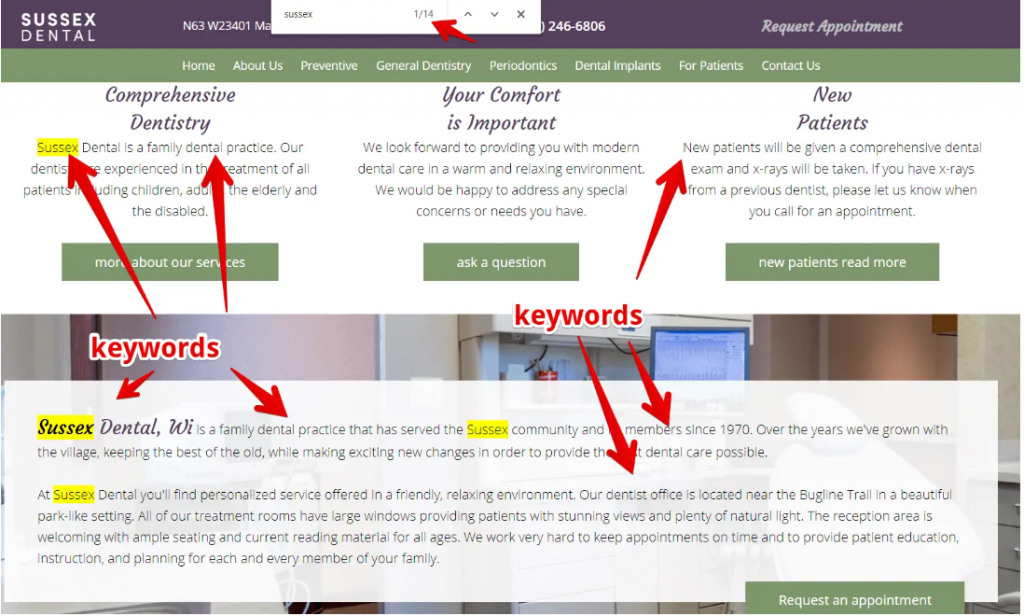
You must also add proper NAP (Name, Address, Phone Number) on the home page. And make sure this NAP stays consistent.

Having a Google map also helps Google better understand that your dental practice is a local business.
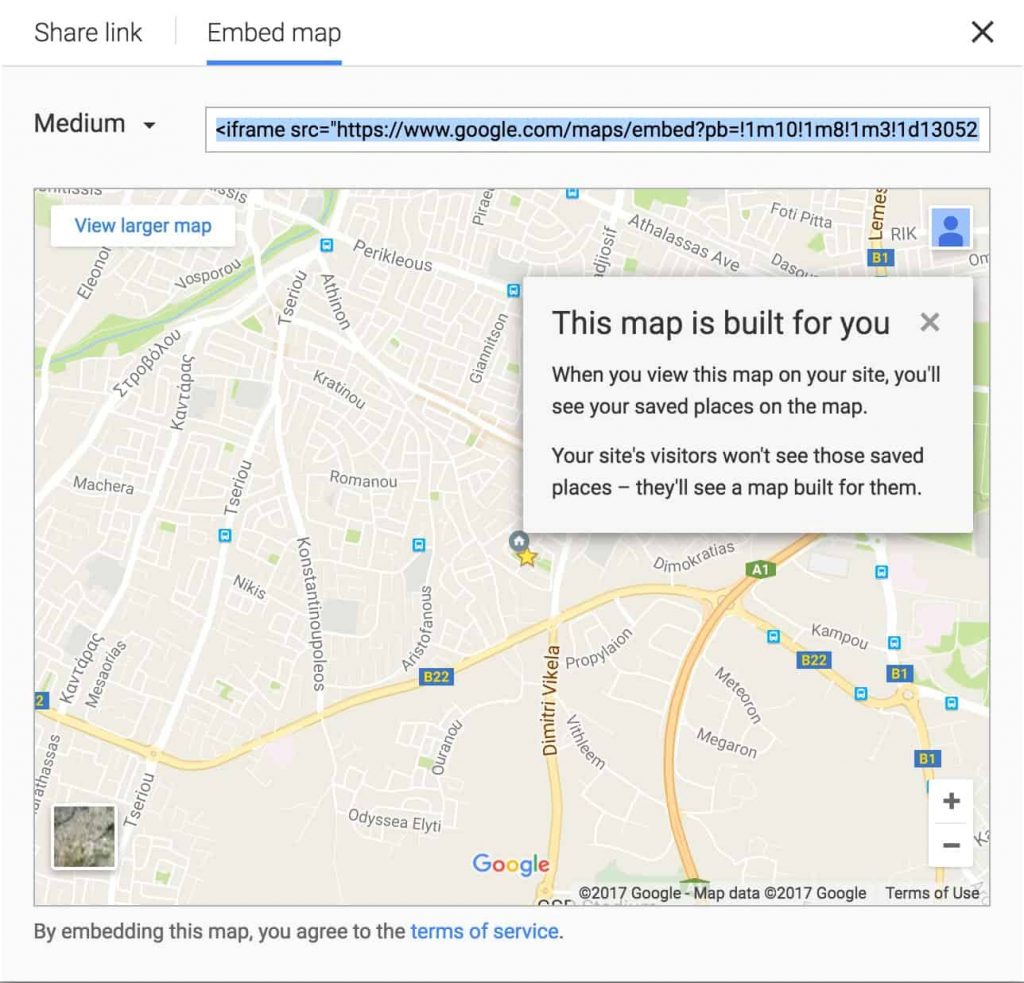
Also make sure you create a Google My Business listing.
And the last (but one of the most important) thing you should do is to acquire citations (backlinks) from other authoritative websites.
This means websites should mention your website along with address, and phone number (if possible).
Leverage other people’s audience
There are 3 important aspects when it comes to marketing:
- The product/services
- The communication channel
- The message
Tapping into someone’s existing audience (a.k.a a partnership) is a great way for you to immediately attract new patients.
Why?
Because you shortcut the trust-building process.
If someone already trusts a person, then it will also trust his or here recommendations.
Of course, provided that the person who recommends a product or service doesn’t recommend any kind of product, ruining his or her credibility this way.
For instance, you can partner up with a plastic surgery clinic.
You could offer their patients a sweet discount to your teeth whitening or cosmetic treatments + a commission to the clinic.
Why a plastic surgery clinic?
Well simply because there’s a high change that someone who is concerned about their aesthetics and is interested in a plastic surgery, will also be interested in having a beautiful smile.
You can also partner up with Facebook groups owners.
The principle stays the same:
- choose a relevant audience for your treatments
- offer an incentive to both the group owner AND his or her community.
Also make sure you:
- Choose an engaged community where people actively discuss certain topics
- Avoid groups full of spam
- Offer some kind of value before marketing your treatments
- [Recommended] Promote useful content/advice before selling your services
- Don’t overspam
Use relevant giveaways to reach more (relevant) people.
Giveaways can add a lot of people to the top of your funnel.
It’s easy to get a viral giveaway, but if you’re offering the wrong prize you can end up spending a lot of money on attracting people who will never become your patients.
For instance, you can offer an iPhone as a prize and you can easily get thousands of email subscribers and Facebook followers.
But how many of them will actually 1) afford and 2) actually want a treatment from your dental practice?
So here are the top 3 most crucial tips for a successful giveaway:
- Offer a relevant prize (avoid iPhones). Try a free teeth cleaning session.
- Nurture those leads. Put them into an email sequence. Retarget them.
- Promote your giveaway to amplify your reach
Improve your copywriting
Have you ever thought about this?
Let’s say you create an ad.
You spend $100 to get 1000 people on your website.
From those 1000, only 1% actually schedule an appointment. That’s 10 patients.
But what if…
You spend $100, you get 1000 people on your website, but now you improve the text on your website and now 2% of the people actually schedule an appointment?
That’s 20 patients.
Think about it, you’ve doubled the number of patients without investing any money.
Now imagine what you can do if you improve:
- The text on your website
- The text of your ads
- The text of your emails
This is the power of copywriting.
Copywriting = the art of writing persuasive texts with the sole purpose of getting a potential customer do a certain action (i.e. schedule an appointment, sign up to your newsletter, click your Google ads etc.)
So before trying to attract new patients, I’d highly recommend hiring a copywriter and look over your entire business.
Use multi-step forms to increase your conversion rate
There’s one little mistake a lot of dentists make that ruin their marketing.
You can literally waste most of your entire marketing budget if you do it.
The mistake I’m talking about is the forms your potential patients have to complete in order to schedule an appointment.
If these are too complicated, you lose a lot of potential patients.
In fact, forms are so important that some companies like Expedia, for example, made an extra $12 million per year simply by removing one field on their form.
But what can you do if you need to ask a lot of info in order to schedule an appointment?
Well, there is a trick.
It’s called a multi-step form and how this works is that instead of people seeing 5 overwhelming fields at once, they see only one per screen.

In this way, they feel like they’re making progress towards a certain goal and thus it increases the changes that people go all the way through.
Ask people a simple, low-risk, yes or no question. Make them take the first step.
Then show them the next fields to complete.
Ask people a simple, low-risk, yes or no question. Make them take the first step.
Then show them the next fields to complete..
Your turn
I hope these dental marketing ideas gave you enough things to work on in order to attract more patients to your dental office.
And now I’d like to hear from you:
Which idea from today’s article would you like to try first?
Or maybe you have a question regarding one of the tactics presented.
Either way, let me know by leaving a comment below right now.
About the author
Patrik Bindea is a growth hacking marketer at Strodin Dental Marketing, where he helps dentists get more patients using digital marketing. He obsessively tests everything until he finds those details that turn strategies, concepts and words into sales.
The post 10 Simple Digital Marketing Ideas For Dentists appeared first on Toronto SEO Expert.
]]>The post How to Track Outbound Links in WordPress appeared first on Toronto SEO Expert.
]]> As webmasters, there are only a handful of things that make us tick. Top of the list is the number of links that are coming into the blog and the stats that concern the traffic to the blog. And while in hindsight these may suffice most of the time, the truth is that there is much more to being successful than meets the eye including the number of outbound clicks from our blog to other websites.
Although it may not sound half as interesting as we would often like, it definitely holds some importance when you want to track links to sites other than your own site. This could be anything between social networks, affiliate products or simply other websites that you have linked from your website.
In this article, we are going to show you how to easily track outbound links in WordPress to see which outbound links get most clicks.
Why Track Outbound Links in WordPress?
After you build your website, the next big thing that you need to do is to acquaint yourself with how users interact with it so that you can find ways to grow it. And while there are literally a plethora of ways you can grow it, one of the best ways to do this is by using Google Analytics because it gives you a much broader spectrum and helps you put things into perspective.
It gives you a pick into where your users are coming from, what pages they are viewing and how much time they are spending on your website or any other particular website for that matter.
What’s more, learning about outbound links helps you comprehend exactly which outgoing links are clicked more often. This information comes in pretty handy especially if you are recommending affiliate products because then it helps you know which products perform better with your audience.
That being said, let’s get into how to easily track outbound links in WordPress.
Tracking all Outbound Links in Google Analytics
- The first thing you need to do is to install and activate a Google Analytics plug-in for WordPress. And while there are numerous plug-ins, one of the most popular and by far the most effective plug-in in Google Analytics is the MosterInsights.
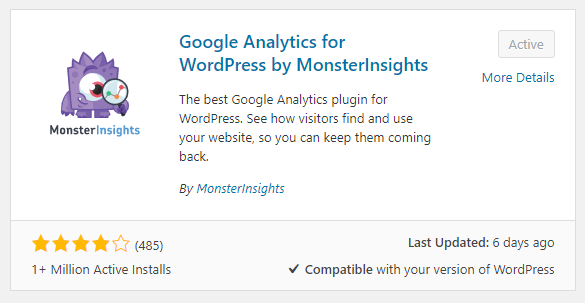
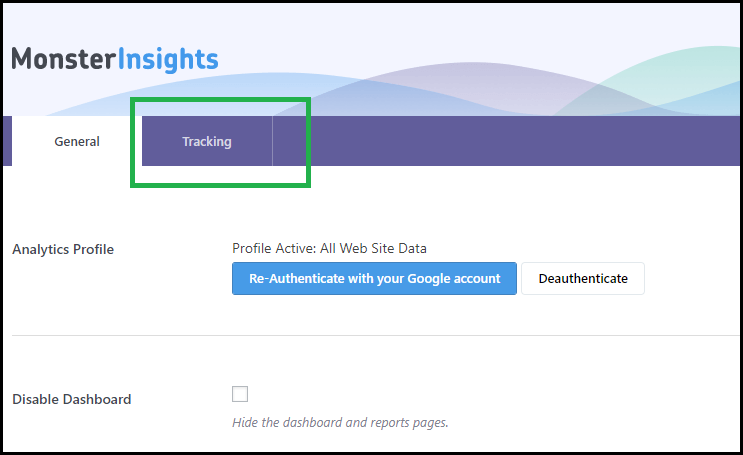
- Upon activation, you then need to visit Insights and then navigate the settings page in your WordPress admin area and click on the Tracking tab.
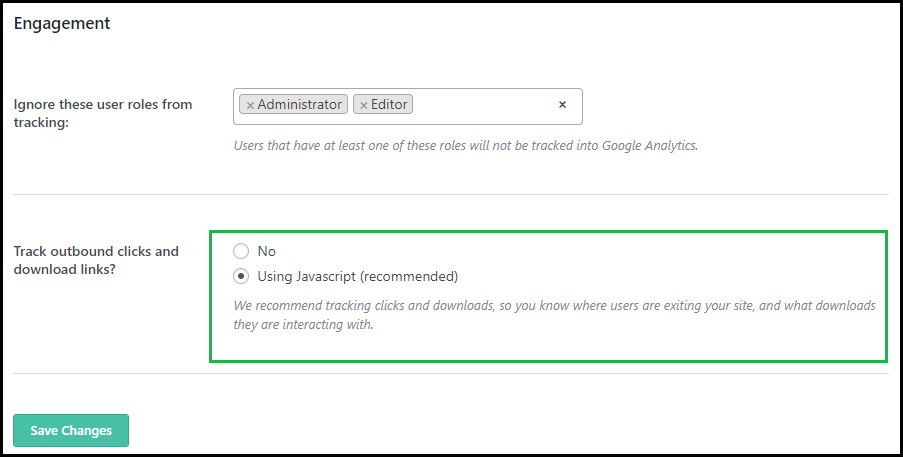
- Once you are over and done with that, you will see Track outbound clicks and download links under the Engagement section which you will select using the JavaScript option and click on the save settings button.
And just like that, you have successfully enabled the tracking of outbound links on your WordPress site
Tracking Internal Affiliate Links as Outbound Links
In efforts to manage and in a way cloak affiliate links, a number of WordPress site owners make use of affiliate marketing plug-ins that can be quite difficult to track as outbound links. However, if you have MonsterInsights, this can be a quick fix situation for you as all you have to do is head to Insights and then navigate the Settings page and click on the Tracking tab.
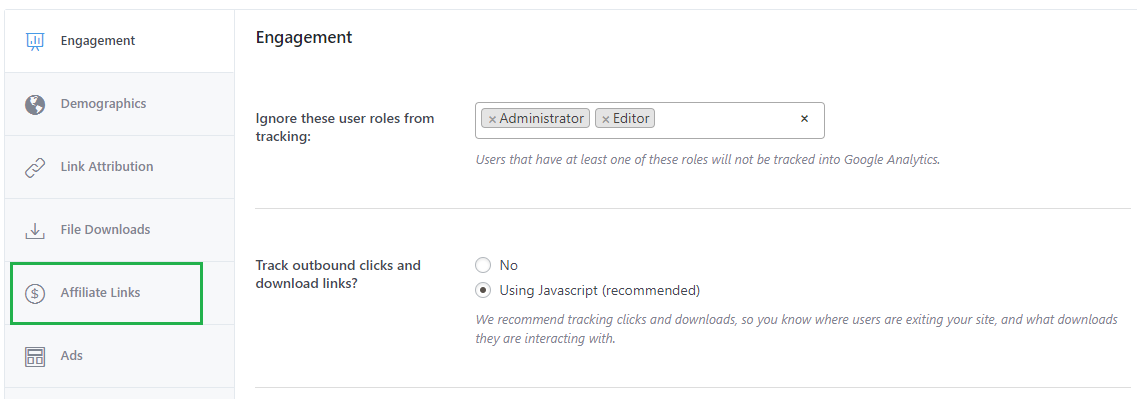
- Here you will find that the tracking page is divided into different sections which then means you will have to choose the one that’s most suitable at that point in time and in this case you need to click the Affiliate Links sections to proceed.
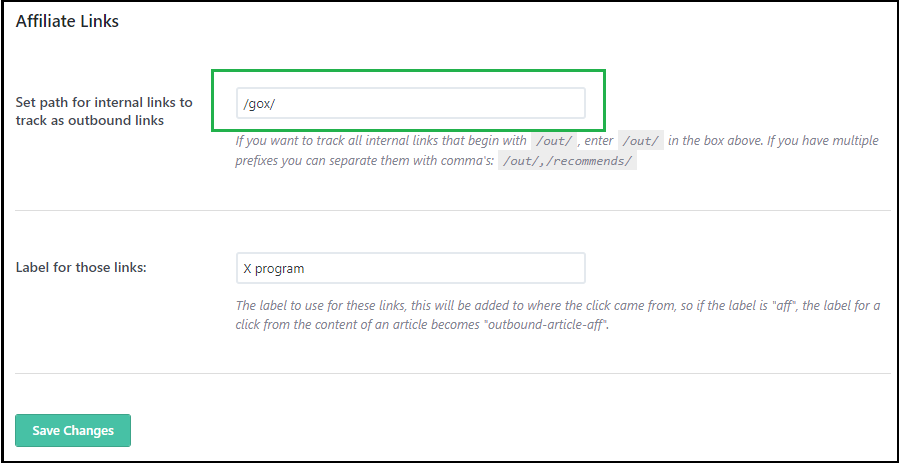
- After that provide the path that you use for affiliate links which is the prefix added by your link cloaking plugin and then provide a label for those links. Click save to store changes and settings.
And like that in a snap, you have activated the tracking for internal affiliate links as well.
Viewing Outbound Link Reports in Google Analytics
Once you have enabled the outbound link tracking on your site, allow Google Analytics about 24 hours to collect the data before you do decide to view.
- After that, log in to your Google Analytics dashboard, click Behavior then Events then navigate to the Top Events page.
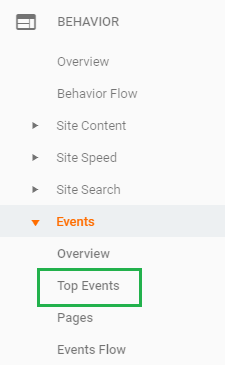
- You will see your outbound links as outbound link event category and the affiliate links will appear with the label you added during setup. You can also view the outbound link activity in real time simply by going to the dashboard, then Real Time and then navigating to the Events page.
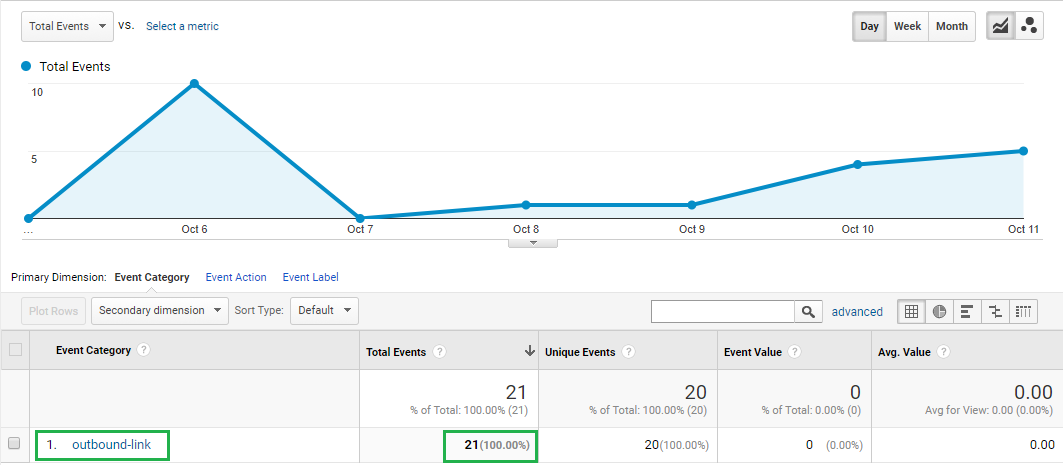
- Clicking on it will give you an insight of what URLs are being clicked on
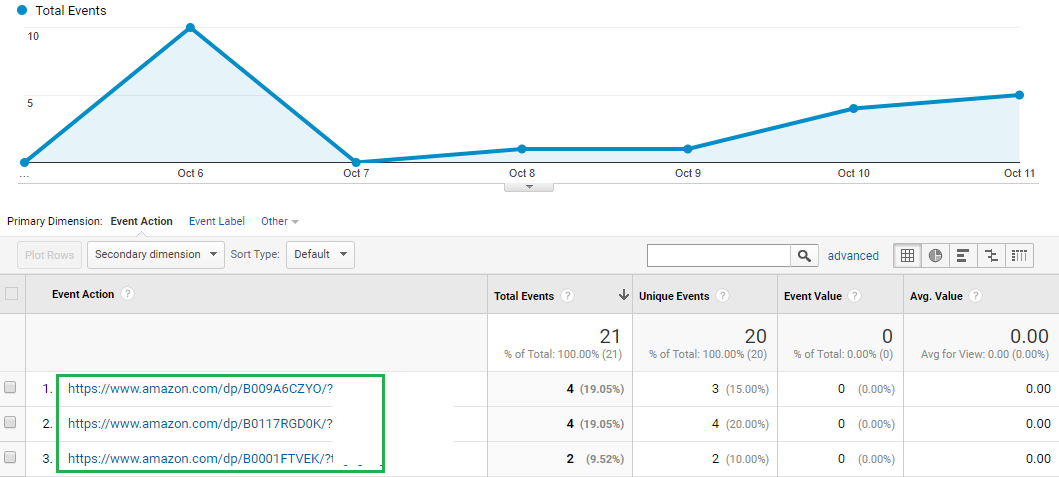
We hope this guide will help you in setting up tracking for your outbound links.If you get stuck at any of the steps, let us know in the comments section below.
The post How to Track Outbound Links in WordPress appeared first on Toronto SEO Expert.
]]>